
Programmer Dvorak Keyboard Layout for Chrome OS
Overview
The Programmer Dvorak keyboard layout extension is designed for developers and power users who seek enhanced typing efficiency and reduced hand strain during prolonged coding sessions. By adapting the ergonomic Dvorak layout with specialized programming symbols, it aims to streamline workflows for those who spend significant time writing code. The extension integrates directly into Chrome OS, allowing users to switch between keyboard layouts using a simple keyboard shortcut: Alt+Shift. Once enabled, the layout appears as a selectable option in the system's language settings, marked by the symbol SV*. This solution is particularly beneficial for individuals who prioritize comfort and speed in text input while working with programming syntax.
Target users include software developers, technical writers, and anyone who frequently types complex code or technical documentation. The layout is optimized for common programming characters such as brackets, braces, and punctuation, positioning them on the home row for faster access. Real-world usage scenarios involve daily coding in environments like Chromebooks, where users rely on built-in keyboard functionality without additional software installations. The extension operates entirely within the Chrome OS ecosystem, ensuring compatibility with web-based development tools and integrated IDEs.
Key Features & Capabilities
- Programmer Dvorak Layout Integration – Offers a customized Dvorak layout tailored for coding, placing frequently used programming symbols on the home row to reduce finger movement and improve typing speed.
- Seamless Chrome OS Integration – Functions directly within the Chrome OS environment, accessible through standard system language settings without requiring external software or drivers.
- Simple Keyboard Shortcut – Allows users to switch between keyboard layouts using Alt+Shift, enabling quick access to the Programmer Dvorak layout during active work sessions.
- Symbol Identification – The layout is identifiable by the SV* symbol in the language settings, helping users confirm activation and avoid confusion with other layouts.
- Compliance with Google Policies – Requires acceptance of Google’s Terms of Service and Privacy Policy upon installation, ensuring adherence to platform guidelines.
Users can apply this layout when working in web-based IDEs, writing scripts, or composing technical content. The layout reduces repetitive strain by minimizing the need for extended finger reach, especially during long coding sessions. While the extension does not modify the underlying OS, it enhances the typing experience through intelligent key placement. The developer did not provide additional details on layout customization options or advanced configuration.
User Interface, Workflow & Performance
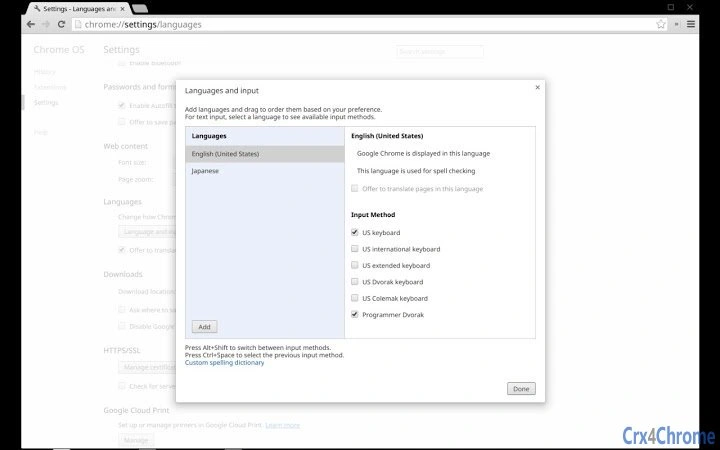
The extension relies on Chrome OS’s built-in language settings for configuration, meaning the user interface is consistent with the platform’s standard design. Navigation is straightforward: users access the settings via chrome://settings/languages, add English(US), and then select the Programmer Dvorak layout from the available options. The workflow is efficient for users familiar with Chrome OS’s language management system.
Performance is expected to be stable, as the extension operates at the system level without requiring additional background processes. It does not consume significant system resources, as it functions as a lightweight input method. The developer did not specify resource usage details, but based on general software behavior patterns, it is likely to have minimal impact on CPU or RAM usage. Stability may be affected in rare cases, particularly after system updates, as noted in the known issue related to Chrome OS M36.
Compatibility & System Requirements
The extension is designed exclusively for Chrome OS, ensuring compatibility with devices running the operating system. It does not support other platforms such as Windows, macOS, or Linux. The version number was not provided, nor were specific hardware requirements. Installation size information is unavailable.
Exact system requirements were not listed. Compatibility information was partially provided, indicating that the extension is intended for Chrome OS 37 and later, with a workaround available for earlier versions affected by a known issue. Users should ensure their Chrome OS is updated to a supported version to avoid functionality problems. The developer did not specify whether the extension works with all Chromebook models or if certain hardware configurations are required.
Pros and Cons
Pros
- Optimized for coding with frequent programming symbols on the home row
- Simple and intuitive setup via Chrome OS language settings
- Lightweight with minimal impact on system performance
- Accessible via standard keyboard shortcut (Alt+Shift)
- Free to use with no hidden costs
Cons
- No detailed documentation or customization options provided
- Known compatibility issue with Chrome OS M36 (workaround exists)
- Only available on Chrome OS, limiting cross-platform use
- Layout symbol (SV*) may be unclear to new users
- Developer information not available
FAQ Section
How do I enable the Programmer Dvorak layout on Chrome OS?
After installing the extension, go to chrome://settings/languages, add English(US), and check the "Programmer Dvorak" option. If it does not appear, sign out and sign back in, then retry the process.
What keyboard shortcut switches between layouts?
Use Alt+Shift to cycle through available keyboard layouts until you reach the Programmer Dvorak layout, identified by the symbol SV*.
Is this extension safe to install?
Yes, the extension operates within Chrome OS and requires acceptance of Google’s Terms of Service and Privacy Policy. It does not access sensitive data or modify system files.
Does the extension require updates?
Updates are managed automatically through the Chrome Web Store. Users should keep their Chrome OS updated to maintain compatibility.
Can I use this layout offline?
Yes, once enabled, the Programmer Dvorak layout functions without an internet connection, as it operates at the system input level.
Final Thoughts
The Programmer Dvorak keyboard layout extension delivers a focused, practical solution for developers and technical users on Chrome OS. Its core strength lies in combining ergonomic typing principles with programming-specific optimizations, offering a tangible improvement in typing comfort and efficiency. While it lacks advanced customization and detailed documentation, its seamless integration with Chrome OS and straightforward activation process make it accessible even to less technical users.
For professionals who rely on their Chromebooks for coding, this tool provides a meaningful enhancement to daily workflows. The free availability and minimal system footprint further increase its appeal. Although it is limited to Chrome OS and has a known issue with older versions, the workaround ensures continued usability for most users.
Download Programmer Dvorak Keyboard Layout for Chrome OS now.







